My Experience
This past quarter has been long and difficult, perhaps the hardest of my college career. Despite this, I had a lot of fun,
learned many new things, and was excited to take a deeper dive into graphics programming and how it works. I did a lot this
past quarter; this is my chance to share what I completed and how I feel it went.
I started the quarter off optimistic about how much I could get done. While this course only required me to spend 6 hours a
week on learning, I had planned to be able to put in many more hours to learn as much as I could about Graphics programming.
I especially wanted to get to light simulation to understand better how we produce such outstanding and realistic lighting
solutions. However, due to some difficult classes and being the lead developer on our senior project development team, I couldn't
put nearly as much time into the project as I had initially hoped. So, let's get into what I did.
During my first meeting with Dr. Arias, he asked me a question. What is it that I want to make? Why am I learning Graphics?
I decided to create a simple library for developers to build and interact with a 3D scene. Something that would make the setup of
OpenGL easy to manage while not limiting their ability to create as much as possible. This meant I needed a way to manage the OpenGL
Window, Create Scenes, Load objects (like 3D meshes) into the scene, move around the scene, and even allow users to create their
own 3D components. With this, the project became a much larger task than I initially anticipated.
During the first couple of weeks, everything seemed to be on track. I had an excellent textbook to follow, and things were coming
together pretty well. I had gotten to the stage where I had a simple triangle rendering to the screen, and I needed to take the
triangle from 2D and make it into an actual 3D mesh. Well, rather than define the mesh manually as a series of positions and
triangles, I decided I wanted to make a class for managing the mesh, such that it could be used like a library. In order to create a
mesh, I also needed to have a Shader, so I decided I would also make a Shader class. Luckily this wasn't too hard to set up since
I've worked with similar engines and know how they accomplished the task. However, I went to test it, and it failed, and unfortunately,
OpenGL makes it difficult to debug the application. Something was wrong, but I didn't know what it was and would have waited to figure
it out later. After many days of struggling with this issue and just moving code around, I discovered the problem. I wasn't
loading the vertices to the GPU in the correct order, and it was ruining the whole thing. This is a significant burden in
graphics programming and is why I wanted to make this library in the first place. Managing all the GPU buffers and OpenGL
objects and calls is messy, and if done in the wrong order, nothing works properly, and it's impossible to debug.
Now that I had OpenGL working with my shader and mesh classes correctly, it was time to work on making the mesh 3D. This is where
some of the more complicated math comes into play. Before anything, however, I make sure to set this up as a library. I decided to
set up a simple scene management system to help manage the cameras and objects I have in the world. At first, I thought this would
be an easy task, but it ended up being more complicated than I thought. I needed to develop a system allowing the user to create
custom objects and add them to the scene. For this, I borrowed a page from Unity's handbook and used inheritance. Every object in a
scene has a parent class, "SceneObject," and everyone inheriting it must implement a start, render, and update function. Start is called
on the first frame of the scene. Render and update are called on every frame, and update is always called before render. This allows
the user to create custom objects and perform actions on them every frame.
Now I can get to the 3D part, except it's about week five at this point, and midterms are coming up… but once midterms were over,
I could finally make things 3D. For this, I needed to use some good linear algebra and transformation matrices. Every object needs
to keep track of its transformation model matrix. To do this, I created a Transform class, which allows the user to keep track of an
object's position, rotation, and scale, and then produces a model matrix for them. This took some time and required me to debug it quite a
bit (the order in which you rotate, translate, and scale a model is essential). At this point, it was around the end of week 6, and I had
gotten a lot done. I now had a Mesh Renderer scene object that kept track of its model matrix, mesh, and shader.
Finally, I've returned to where I started, and I can draw a proper mesh to the screen. However, I haven't yet gotten to the 3D part of my
code. Right now, it just displays the mesh as a 2D object that fits within the screen's coordinates. To move it to 3D, I also need to create
a view and projection matrix. Luckily, the view and projection Matrices are easy to create since GLM (the OpenGL math library I've been using)
has built-in methods for creating them. I create the matrices, and now I finally have the ability to make my mesh 3D. Once again, however, I
realize I must get these matrices to the GPU. I modified the shader class and made it possible to pass Uniforms to the shader. I ran into a
few more bugs, but finally, I have a cube rendered to the screen.

I think it looks pretty good, but I feel most people will get confused about what they are looking at. It has no color
and looks more like a cube's bright shadow than an actual cube. I need to add a texture.
Adding a texture is surprisingly easy. However, I must do a few things to make the texture work. First, I must make it so
every vertex on my mesh also has a uv (texture coordinate). Luckily, I already knew this when I created the mesh class in the
first place, and I already had that working. I just needed to load the texture and send it to the GPU. Using a 3rd party
library, I get the texture as a PNG, and boom, I have a textured cube.
Here's a picture of it:
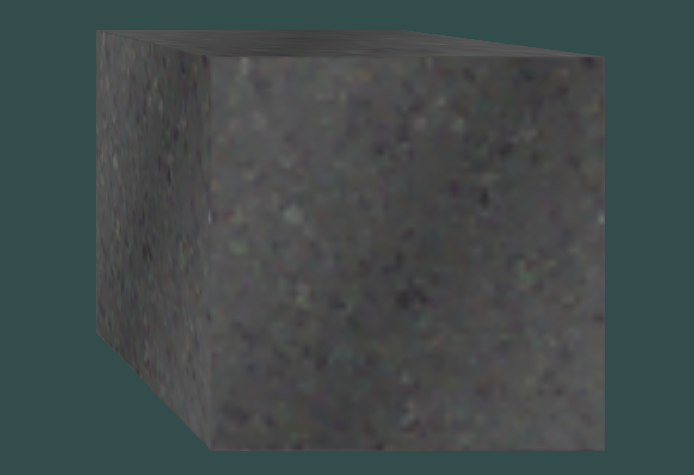
Finally, I have something to show off. My cube is rendered to the screen with textures. At this point, I'm pushing week 9, so
I quickly slapped a camera together and then got to work on this website here.
I still have a few more things I want to do before putting the project down, but as I'm sitting here now, it's week 10, and I'm
rushing to get through the quarter. I intend to work on this project in the future, but right now, I have to put it on hold
until I have some free time to get it done. However, I have learned a ton during the creation of this project. Not only did I
learn all about 3D meshes, shaders, GPU buffers and programs, vectors and matrix math, parallel computing, camera, and creating
C++ libraries, but I also learned what it means not to finish a project on time. I fell behind, didn't get nearly as far as I
wanted, and knew I wasn't going to get there when I had only just gotten things working around week 7. As a result, I consulted
with Dr. Arias, and he helped me to reduce the scope and keep my focus on making sure I at least got something done, even if more
could've been added. I thought doing an independent study would be fun and easy, but I honestly forgot what it means to work
independently. Everything had to be learned on my own, and the only reason I made it as far as I did was because of the wonderful
textbook I followed. I'm glad I did this independent study and learned a little bit more about this field I am so passionate about.
Thanks for checking it out!!!
- Noah